
On this page
Before you start See which peers Clio can use Choose managed work or an interactive handoff Give one bounded assignment Keep worker authority separate Separate changes with a worktree Review before combiningYou can use Clio Coder to coordinate the coding agents you already have installed. Give a peer a focused assignment, follow a managed run where the connector supports it, and review its output before accepting the change.
Before you start
- Clio Coder with one working model connection. The first session covers it.
- A peer's CLI installed and signed in under its own account.
- An assignment whose answer you can check against the repository.
See which peers Clio can use
Shell
clio-coder interop inspect --json
clio-coder configure --interop
The first command reports what Clio can find; the second configures interoperability. In a terminal conversation, /interop shows the available connections. The interoperability guide covers the mode for each peer.
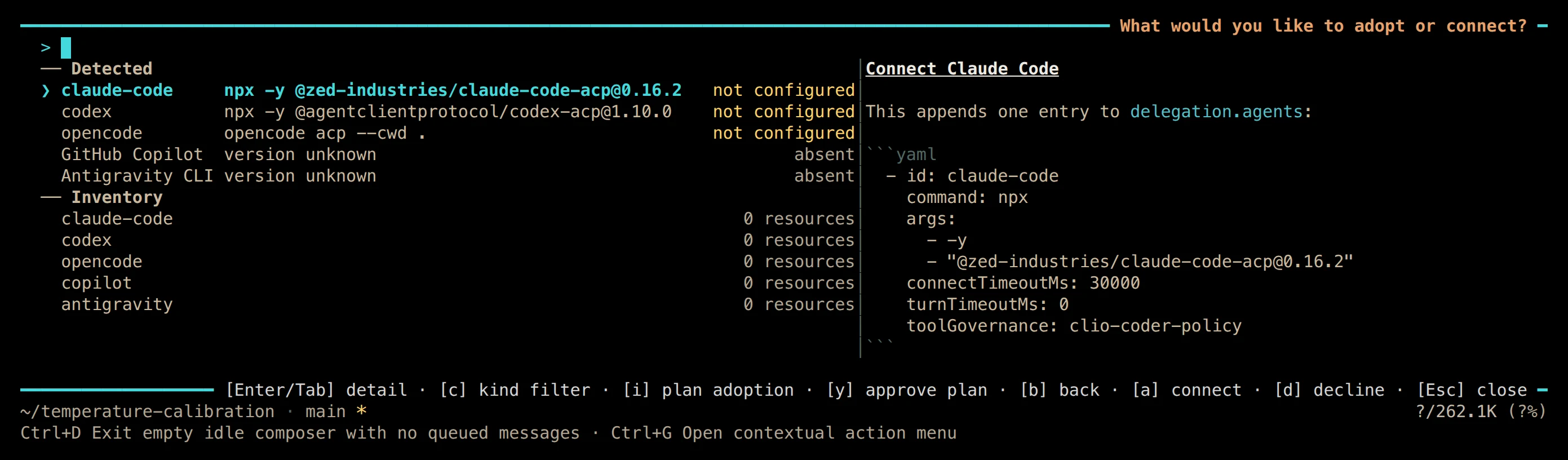
01 /interop lists the coding agents Clio detected and the entry that connecting would add. Terminal · v0.5.7
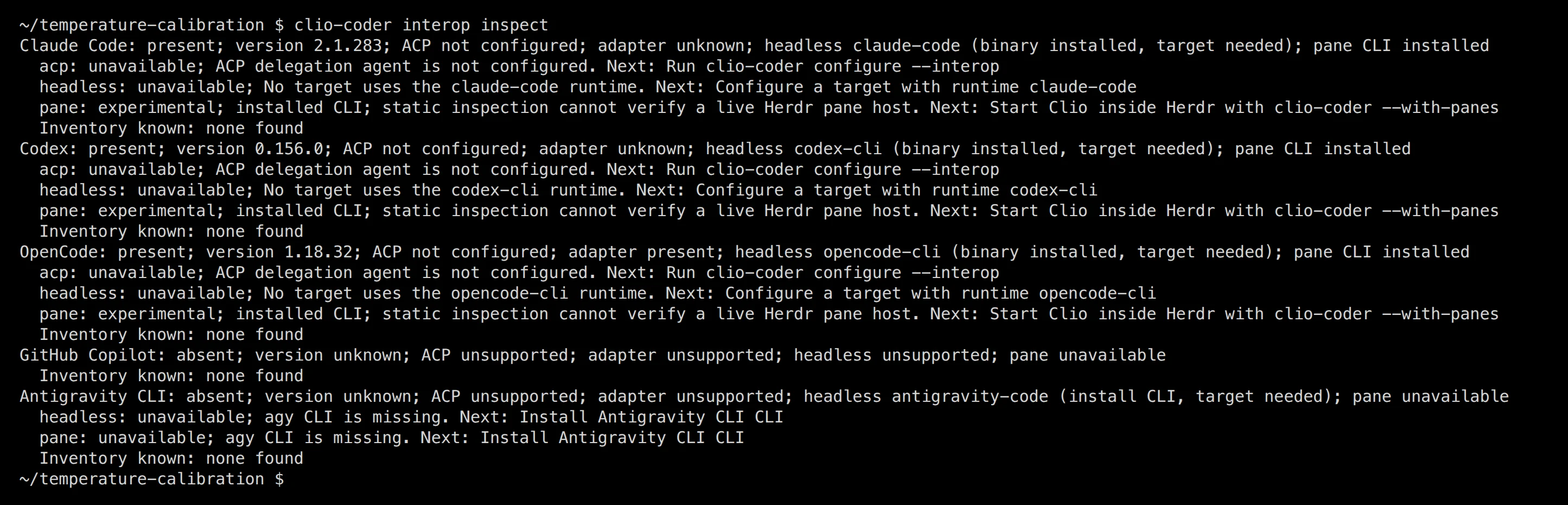
02 interop inspect reports each peer's managed, headless, and pane modes and the next step for each. Terminal · v0.5.7
Choose managed work or an interactive handoff
The three commands answer different needs. Pick by whether you want a recorded run or a place to work with the peer yourself.
| Command | What happens | What Clio records |
|---|---|---|
/delegate <peer> <task> |
A configured ACP peer runs the task | The result and a receipt |
/run --target <target> <agent> <task> |
A configured headless target runs it | The result and a receipt |
/peer <peer> <brief> |
A Herdr pane opens for you to work in | No managed receipt |
Do not infer that a pane completed a task because it opened. Do not infer that a managed receipt contains every internal reasoning step or mediates every operation inside a peer-owned loop.
Give one bounded assignment
Inspect the parser's handling of empty input. Identify the existing tests and propose a regression test. Do not edit files.
That last sentence is a task instruction, not an enforced boundary. Where supported, select the actual read-only restriction on the dispatch and inspect the admission preview. A connector that cannot enforce a restriction is not equivalent to one that can.
Keep worker authority separate
Dispatched workers and external peers run at default, even when the main session uses yolo. Read-only is a restriction on one dispatch; Clio does not carry the main session's unrestricted setting into every worker.
Each peer enforces read-only through its own mechanism. Check the mode you select instead of assuming one contract for all of them.
| Peer | Read-only headless run in v0.5.7 |
|---|---|
| Codex | Its read-only sandbox mode |
| Claude Code | Plan mode with read tools |
| Antigravity | Its plan and sandbox route |
| Pi | Read tools |
| OpenCode | Refused before launch |
ACP peers may own their tools. Explicitly permitting peer-owned tools changes what Clio can observe and mediate, so read the guide's permission limits before using such a peer on sensitive work. Clio's coordination is not an operating-system sandbox.
Separate changes with a worktree
For supported headless dispatch, --worktree keeps a Git task branch for review. That helps you compare two proposed changes without mixing their working files.
A worktree is an organizational boundary. It does not confine a peer's filesystem or network access. Keep assignments narrow, inspect the branch and diff, and run the repository's checks before merging a result.
Review before combining
What to look for
A useful result may be a diagnosis, a patch, or a failed attempt that reveals a missing dependency. Look for the files it touched, the checks it ran, and the limits of its report. A claimed test result and an observed check are different evidence.

The worker above ran on a small model, made no tool calls, and still reported a passing suite. Its receipt keeps the difference: the verdict repeats the claim, and the quality line says no validation was observed.
When comparing agents, give them the same task and evaluate the actual output. Record the model, connector, setup, check results, and any costs you can substantiate. Clio coordinating two peers does not make either one better.
Boundaries
- Supported modes differ by peer, and some cannot receive live steering.
- A pane is an interactive handoff; it produces no managed receipt.
- Peer accounts, subscriptions, and usage limits stay with each peer's own provider.